
When you’re preparing brochures, manuals, reports, catalogs, or marketing materials, you may come across the option “Collate” in your printer settings. Many people skip over it without understanding its purpose, yet this simple feature can save hours of manual sorting. If you’ve ever wondered what does collate mean when printing, you’re in the right place.
Whether you’re printing at home, in an office, or ordering professionally printed packaging inserts from Packaging Aazz, understanding collation helps you organize documents efficiently and avoid unnecessary mistakes.
Businesses that rely on quality printed packaging often combine organized printing with premium packaging solutions from Packaging Aazz, ensuring every product presentation looks professional from production to delivery.
Understanding What Does Collate Mean When Printing
The easiest way to explain what does collate mean when printing is this:
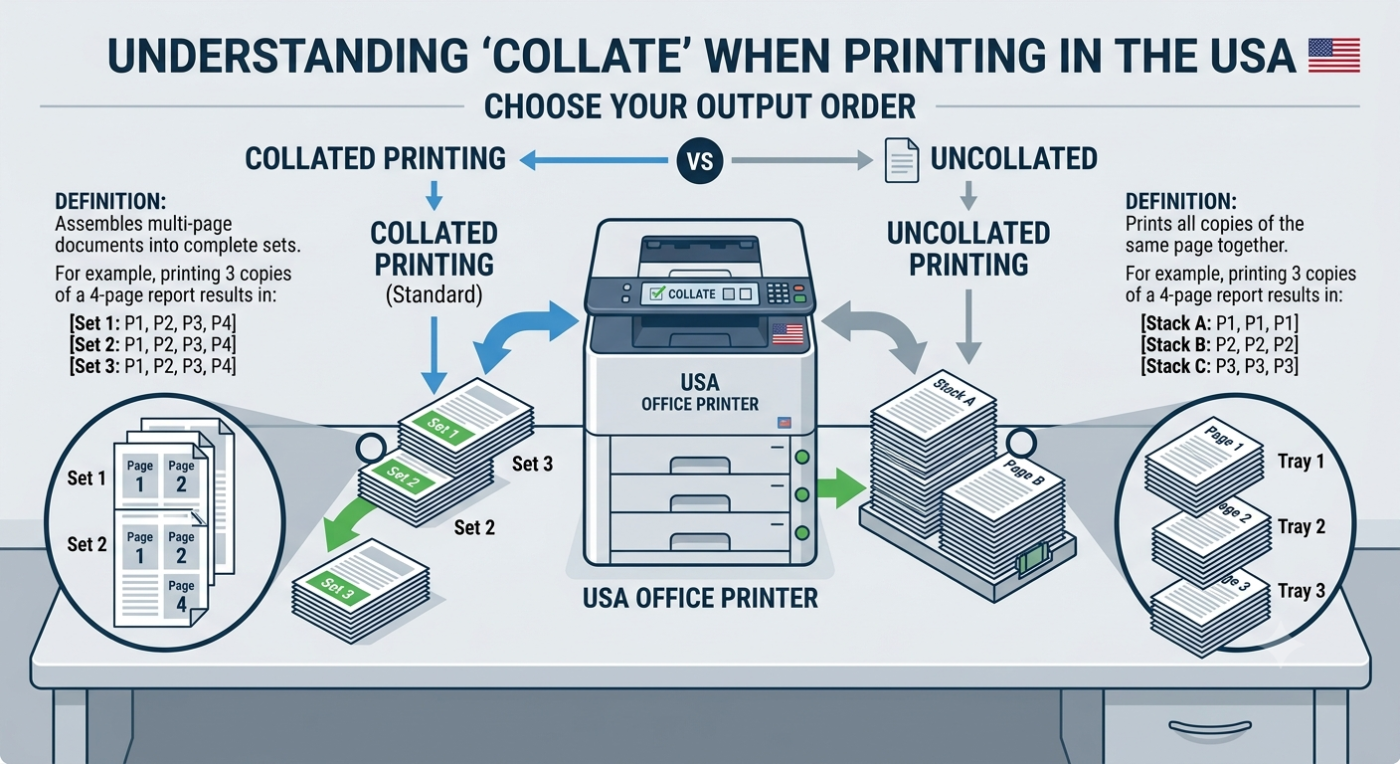
Collating means printing complete document sets in the correct page order before starting the next copy.
Imagine your document contains five pages and you need three copies.
When Collate is ON
Your printer produces:
| Copy | Printed Pages |
|---|---|
| Copy 1 | 1 → 2 → 3 → 4 → 5 |
| Copy 2 | 1 → 2 → 3 → 4 → 5 |
| Copy 3 | 1 → 2 → 3 → 4 → 5 |
Each copy is already assembled.
When Collate is OFF
The printer produces:
| Print Sequence |
|---|
| 1, 1, 1 |
| 2, 2, 2 |
| 3, 3, 3 |
| 4, 4, 4 |
| 5, 5, 5 |
You’ll need to manually separate and organize every document afterward.
For businesses printing instruction manuals, invoices, warranty cards, or branded inserts, using collate significantly improves workflow.
Why the Collate Feature Matters
Knowing what does collate mean when printing becomes especially valuable when handling multiple-page documents.
Without collating:
- Documents require manual sorting
- Mistakes become more common
- Employees spend unnecessary time organizing pages
- Customers may receive incomplete document sets
With collating:
- Every copy stays complete
- Printing becomes faster
- Fewer errors occur
- Distribution is much easier
Professional packaging companies often combine properly collated inserts with customized packaging to create a polished customer experience.
For example, brands ordering custom packaging usa frequently include product manuals, warranty cards, promotional flyers, or thank-you notes that are already collated before being packed.
Common Examples of Collated Printing
Here are situations where collated printing saves significant time.
Employee Training Manuals
A company printing 100 training manuals wants every employee to receive:
- Cover
- Introduction
- Policies
- Procedures
- Safety Guide
Collating ensures every manual arrives complete.
Product Instruction Guides
Manufacturers frequently include printed instructions inside packaging.
For businesses using custom packaging los angeles usa, collated instruction booklets eliminate packaging errors during assembly.
School Assignments
Teachers often print classroom materials containing multiple pages.
Collated printing means every student immediately receives a complete packet.
Event Programs
Conference organizers print hundreds of programs.
Instead of sorting page stacks manually, collated printing prepares finished copies automatically.
How Printers Perform Collation
Modern printers handle collation automatically through software.
The printer:
- Receives the document.
- Stores page order.
- Prints every page sequentially.
- Repeats the process for each requested copy.
Many commercial digital presses perform this process extremely quickly, making large production runs efficient.
This is particularly useful for companies producing printed inserts alongside retail packaging usa solutions.
When Should You Use Collate?
Understanding what does collate mean when printing helps you know when to activate the setting.
Use collate when printing:
- Reports
- Manuals
- Catalogs
- Product instructions
- Company handbooks
- Presentation materials
- Educational booklets
- Contracts
- Marketing brochures
Avoid using collate if you’re printing:
- Single-page flyers
- Labels
- Posters
- Business cards
- One-page advertisements
Collated vs Uncollated Printing
Here’s a simple comparison.
| Feature | Collated | Uncollated |
|---|---|---|
| Complete document sets | Yes | No |
| Manual sorting required | No | Yes |
| Best for reports | Yes | No |
| Best for books | Yes | No |
| Faster packaging workflow | Yes | No |
Many packaging facilities rely on collated printed inserts before placing them inside custom gift boxes wholesale usa or premium retail packaging.
Quote now
Does Collating Affect Print Quality?
No.
Collation changes only the printing order.
It does not affect:
- Color accuracy
- Resolution
- Ink quality
- Paper thickness
- Print sharpness
Your pages look exactly the same.
Only the sequence changes.
Collated Printing in Commercial Packaging
Packaging manufacturers frequently print more than just boxes.
They produce:
- Instruction manuals
- Promotional inserts
- Coupons
- Thank-you cards
- Warranty documents
- Assembly guides
Packaging companies like Packaging Aazz combine high-quality packaging production with organized printing workflows.
Businesses purchasing product packaging los angeles usa often include collated printed materials inside every package for consistency.
Industries That Depend on Collated Printing
Nearly every industry benefits from organized print production.
Examples include:
- Healthcare
- Education
- Manufacturing
- Cosmetics
- CBD products
- Food packaging
- Retail
- Electronics
- Automotive
- Pharmaceutical
For example, companies ordering custom cosmetic packaging usa frequently include folded instruction leaflets that are collated before insertion.
Likewise, businesses purchasing custom supplement packaging usa often require dosage guides and safety instructions printed in proper sequence.
Printing Large Documents
Suppose you’re printing:
- 75-page manual
- 250 copies
Without collate:
You receive:
- 250 copies of page 1
- 250 copies of page 2
- 250 copies of page 3
Someone must organize every manual manually.
With collate:
The printer automatically assembles all 250 complete manuals.
That’s why understanding what does collate mean when printing becomes increasingly valuable as print volume grows.
Collated Printing for Product Packaging
Packaging isn’t just about the outer box.
Customers expect organized documentation inside.
Common inserts include:
- Warranty cards
- User guides
- Discount vouchers
- Product registration cards
- Safety information
- Installation instructions
Companies investing in custom jewelry packaging usa or luxury jewelry packaging usa frequently pair premium presentation with neatly collated documentation to improve the unboxing experience.
Common Misunderstandings About Collation
Many users think collating means:
- Better print quality
- Faster printer speed
- Stapling pages
- Folding documents
None of these are correct.
Collating simply controls the order in which multiple copies of multi-page documents are printed.
Once you understand what does collate mean when printing, using printer settings becomes much easier and more efficient.
What does collate mean when printing and why is it important?
When people search what does collate mean when printing, they usually want to understand why their printer has a collate option in the first place. Collating simply means your printer keeps each full document together in the correct order. So instead of printing all page 1s, then all page 2s, it prints a complete set like 1-2-3-4 before moving to the next copy. This makes everything easier to handle, especially when you’re working with multi-page documents like reports or product guides.
If you’re running a business that deals with packaging or inserts, this becomes even more useful. For example, brands using custom packaging usa often include printed instructions or product details inside boxes. Collated printing ensures every package gets a complete, properly ordered set. It’s also widely used in industries like retail packaging usa or custom cosmetic packaging usa where presentation and accuracy matter a lot. When everything is in order from the start, you save time and avoid mistakes during packaging.
What happens if I don’t use collate when printing multiple pages?
If you don’t use collate, your printer will group all pages together instead of making complete sets. So you’ll get stacks of page 1, then stacks of page 2, and so on. That means you’ll have to manually sort everything afterward, which can be time-consuming and confusing, especially if you’re printing a large document.
This becomes a bigger issue in packaging and fulfillment work. Businesses using custom packaging los angeles usa often print product manuals, care instructions, or promotional inserts. Without collating, workers would have to sort hundreds or thousands of pages before placing them into boxes. The same applies to industries using custom supplement packaging usa or custom vape packaging usa, where accuracy is critical. Missing or misplaced pages can create confusion for customers and reduce trust in your brand. Collating removes that problem by keeping everything organized from the moment it prints.
Is collate the same as double-sided printing?
No, collate and double-sided printing are completely different features. When people search what does collate mean when printing, they often confuse it with duplex printing. Collate controls the order of pages, while double-sided printing controls whether pages are printed on both sides of the paper.
You can actually use both together if needed. For example, if you’re printing instruction manuals for products from custom packaging usa, you might use double-sided printing to save paper and collate to keep pages in proper order. That way, every booklet comes out complete and well structured without extra sorting work.
This combination is very common in industries like custom cosmetic packaging usa and custom jewelry packaging usa, where presentation matters a lot. You want your printed materials to look clean, professional, and easy to follow. So even though both features sound similar, they solve very different problems in printing workflows.
When should I turn on collate while printing?
You should turn on collate whenever you’re printing multiple copies of a multi-page document. If your file has more than one page and you need several copies, collating ensures each copy is complete before starting the next one. That’s the easiest way to understand what does collate mean when printing in everyday use.
For example, businesses using retail packaging usa often print brochures, product sheets, or instruction guides that go inside packaging. Collating helps keep every set complete and ready for use. It also saves a lot of manual sorting time.
Companies using custom packaging phoenix usa or custom packaging miami usa rely on this feature during bulk production. When thousands of inserts are printed, even small mistakes can slow down the entire packaging process. Collate keeps everything organized and ready to pack, which helps improve efficiency and reduce errors.
Does collate affect print quality or ink usage?
No, collate does not affect print quality or ink usage at all. Your colors, sharpness, and resolution stay exactly the same whether you turn collate on or off. When people search what does collate mean when printing, they sometimes think it changes how the printer prints each page, but it only changes the order of printing.
For example, if you’re working with custom packaging usa, collating doesn’t impact how your instruction sheets or product inserts look. It only ensures they are arranged correctly. This is especially helpful for businesses using custom vape boxes usa or custom jewelry packaging usa, where printed materials need to be neat and consistent.
Since collating only affects organization, it doesn’t increase ink consumption or change printing speed significantly in most cases. It’s purely a workflow feature designed to make handling printed documents easier and more structured.
Why do offices always prefer collated printing?
Offices prefer collated printing because it saves time and avoids confusion. Instead of sorting stacks of paper manually, every document comes out complete and ready to distribute. That’s one of the biggest reasons people look up what does collate mean when printing in workplace environments.
For example, if a company prints 50 copies of a report, collating ensures each report has all pages in order. This makes meetings, presentations, and distribution much smoother.
In packaging-related industries like custom packaging usa, collated printing is also widely used. Companies producing custom cosmetic boxes usa or custom supplement packaging usa often include printed leaflets or guides inside packaging. Collating ensures every customer receives a complete and professional-looking set of materials. It reduces human error and keeps everything consistent across large production runs.
Can collate be used for large printing jobs?
Yes, collate is actually most useful for large printing jobs. When you’re printing hundreds or thousands of pages, organizing them manually would take too much time. Understanding what does collate mean when printing becomes very important in bulk production environments.
For example, companies using custom packaging usa often print instruction manuals, warranty cards, or promotional inserts in large quantities. Collating ensures every set is complete before it goes into packaging. This is especially helpful in industries using custom packaging california usa or custom boxes canada, where large-scale fulfillment requires speed and accuracy.
Without collating, workers would need to sort every page manually, which increases the chance of errors. With collate turned on, everything is automatically arranged in proper order, making the entire workflow smoother and faster.
What is the difference between collated and uncollated printing?
Collated printing produces complete sets of documents in order, while uncollated printing groups all pages together by number. So collated means each copy is finished from start to end, while uncollated means you get stacks of the same pages.
This is a key concept when understanding what does collate mean when printing, especially if you deal with multi-page documents regularly.
For example, businesses using retail packaging usa or custom gift boxes wholesale usa often include printed inserts in packaging. Collated printing ensures each product gets a complete set of instructions or promotional material.
Uncollated printing might only be useful when you’re manually sorting pages for a specific reason. But in most packaging and office workflows, collated printing is the preferred option because it reduces confusion and speeds up the entire process.
Does collate matter for home printing or only business use?
Collate matters for both home and business printing. Even at home, understanding what does collate mean when printing can save you a lot of time. If you’re printing school assignments, recipes, or booklets, collating ensures everything stays in order without manual sorting.
At home, it helps when printing small projects or documents for personal use. In businesses, it becomes even more important because of larger print volumes.
Companies using custom packaging usa rely heavily on collated printing for inserts and documentation. Whether it’s custom packaging los angeles usa or custom packaging miami usa, organized printing helps maintain quality control. So whether you’re printing one document or thousands, collate makes everything easier to manage.
Is collated printing better for packaging inserts and product guides?
Yes, collated printing is much better for packaging inserts and product guides. When you’re preparing materials for customers, everything needs to be clear, complete, and consistent. That’s why understanding what does collate mean when printing is important in packaging workflows.
For example, businesses using custom cosmetic packaging usa or custom supplement packaging usa often include printed leaflets inside product boxes. Collating ensures every leaflet set is complete before packaging begins.
It also helps industries using custom vape packaging usa or custom jewelry packaging usa maintain consistency across all products. When everything is organized properly from the printing stage, your packaging process becomes smoother, faster, and more professional.
